Lighting for Security Cameras: WDR, IR & Color-at-Night
By Justin C., Video Security System Specialist — A2Z Security Cameras
Last updated: January 22, 2026
Great video at night is mostly about light—what kind, how much, where it’s aimed, and when it turns on. While resolution and analytics matter, usable nighttime footage from security cameras is ultimately determined by illumination and how effectively the surveillance camera manages it. Poor lighting forces CCTV or IP camera systems into high gain, long exposures, or aggressive noise reduction, all of which erase detail when it matters most.
This guide shows how to combine WDR, IR illuminators (850nm, 940nm, and the less common 780nm), and modern dual-light (IR + white) designs to get clean, identifiable footage from security cameras without annoying neighbors, washing out faces, or creating unstable exposure at night. In practice, the right approach usually comes down to how far you need your surveillance camera to see, how covert the installation must be, and how much visible light is acceptable in the environment—especially for CCTV or IP camera deployments.
What “Good” Night Video Looks Like
At night, “good” video isn’t about simply detecting motion—it’s about capturing usable detail where it matters for security cameras and surveillance camera evidence.
- Faces and license plates are readable at the distances that matter to you.
- Motion remains clean and natural, without smear from long shutter speeds.
- Highlights from headlights, porch lights, or signage don’t crush shadow detail.
- Neighbors don’t complain about glare or light trespass.
- The CCTV or IP camera remains stable, without focus hunting or blown-out “white face” near the lens.
These outcomes are the result of balanced lighting, not raw brightness.
WDR vs. Night Lighting: Who Does What?
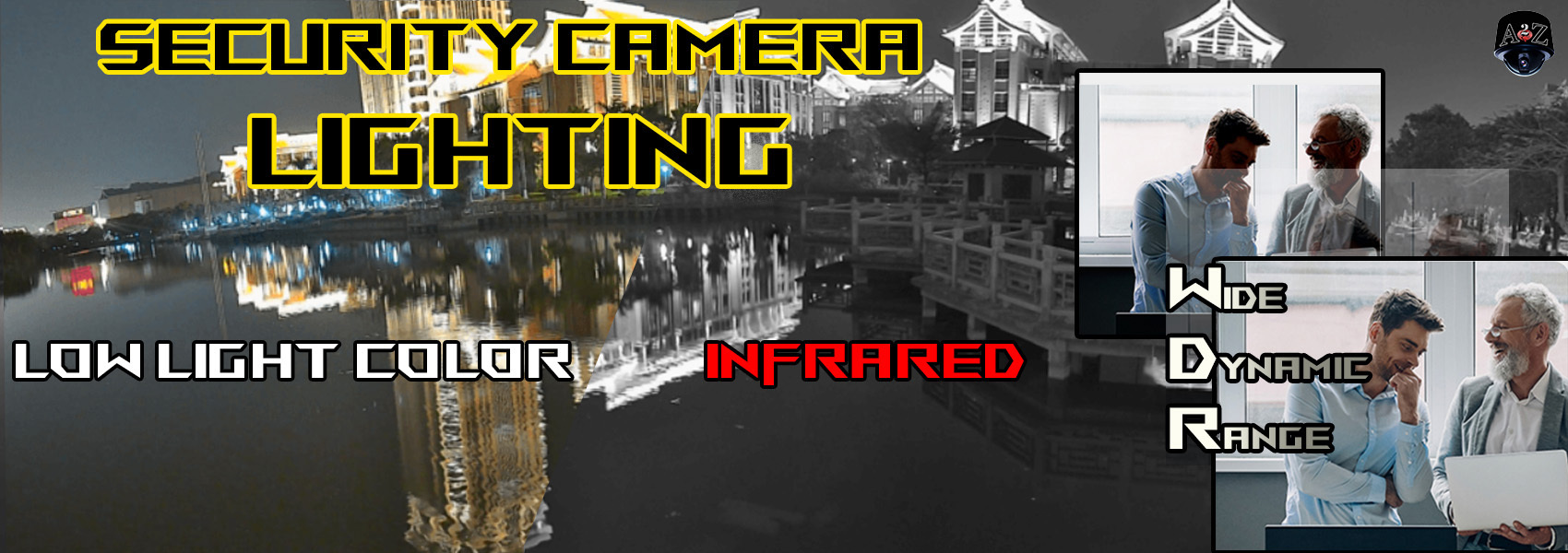
Wide Dynamic Range and lighting solve different problems, but they can sometimes also work best together in security cameras.
- True WDR (multi-exposure) preserves detail across bright and dark areas of the same scene—useful for entryways facing windows, loading docks with headlights, or storefronts with illuminated signage.
- Digital WDR / BLC is more limited, but can still help when contrast is moderate.
- Lighting (IR or dual-light) reduces how hard the CCTV or IP camera must work by increasing the core ingredient surveillance cameras rely on to produce usable signal across the scene.
At day or night, WDR manages contrast; lighting creates detail. When a scene is properly filled with IR or controlled white light, WDR has far less contrast to bridge, resulting in cleaner frames with lower noise and more consistent exposure.
Tip: Some scenes can benefit from keeping WDR enabled at night, but don’t expect it to “create” detail in darkness. Give the security camera sensor usable light to work with.
Day/Night Modes, Monochrome, and IR Sensitivity
How a CCTV or IP camera performs at night depends heavily on its day/night design.
Cameras with a mechanical IR-cut filter (ICR)—often referred to as True Day/Night—physically remove the filter at night. This allows the sensor to operate in monochrome mode and become sensitive to infrared light, dramatically improving low-light performance and IR efficiency for security cameras.
By contrast, Digital Day/Night cameras do not use a mechanical filter. They remain optimized for visible light and simulate night mode electronically. While they can work in low-light scenes with ambient illumination, they are typically far less effective or even incompatible with IR illumination and often produce dimmer, noisier nighttime images.
For any surveillance camera installation that relies on IR illumination, a true day/night security camera with an ICR is strongly preferred.
At-a-Glance: 780nm vs 850nm vs 940nm IR wavelengths
| Wavelength | Visibility to Humans | Typical Sensor Response | Effective Range (like-for-like optics) | Common Uses | Notes |
|---|---|---|---|---|---|
| 780nm | Noticeably deep-red glow | Good; near visible band | Short–Medium | Specialty scenes, legacy gear | More visible than 850nm; less common in modern CCTV/IP deployments. |
| 850nm (semi-covert) | Faint red glow on the LED | Strong (often peak sensitivity) | Medium–Long | General-purpose IR, exterior CCTV/IP | Best overall reach and brightness; slight visible glow. |
| 940nm (covert) | No visible glow | Lower (~25–40% less than 850nm) | Shorter than 850nm | Covert, residential, sensitive sites | Truly covert; compensate with tighter beams or more power. |
In most applications, 850nm delivers the best performance per watt for security cameras. 940nm is ideal when visible glow must be eliminated, with the tradeoff of reduced distance. 780nm remains a niche option for specialty or legacy scenarios.
Built-In vs. Supplemental Lighting — A Balanced Take
Many modern security cameras ship with capable, well-tuned illumination systems. In the right use case, built-in IR or dual-light can deliver excellent results without extra hardware. The key is matching the light to the scene rather than assuming more power is always better—especially with CCTV or IP camera installations where mounting location is fixed.
When built-in illumination is enough - Short to mid-range scenes (≈15–100 ft / 5–30 m) where LED spread closely matches field of view.
- Smart IR and auto-exposure reduce close-range blowout.
- Tight views such as doors, gates, or narrow walkways.
- Dual-light models using white light only on events for color-at-night on objects within specified range.
When supplemental (external) lighting wins - Long throws or wide areas like parking lots and yards.
- Mixed lighting environments with headlights, signage, or windows.
- Placement constraints that cause reflections from eaves, domes, or walls.
- Covert or semi-covert requirements with strict light-trespass limits.
External lighting also allows the light to be placed where it works best, rather than where the surveillance camera must be mounted.
Practical tuning checklist - Match beam angle to FOV—wide for patios, narrow for driveways or gates.
- Aim the hot spot slightly below facial height at the target distance.
- Use WDR and smart IR together; don’t rely on one to solve everything.
- Prefer matte surroundings to minimize IR reflections.
Dual-Light (IR + White) Techniques for Deterrence & Evidence
Dual-light combines invisible IR for passive monitoring with on-demand white light to capture color or actively deter intruders—useful for many security cameras where you want both evidence quality and deterrence.
Common dual-light modes - IR default with White-on-Event for color evidence
- Warning flash/strobe for active deterrence
- Low-level courtesy light for safer movement and faster focus
- Schedule-aware operation (white early evening, IR overnight)
Used thoughtfully, dual-light improves identification and reduces noise by filling shadows. Poorly configured, it can cause nuisance lighting, insect attraction, or policy issues. Analytics-based triggers, reasonable dwell times, and careful scheduling are essential for CCTV or IP camera sites.
Beam Selection & Distance: Getting the Numbers Right
Lighting performance should be evaluated using Pixels-Per-Foot (PPF) at night, not just advertised distance. Identification typically requires more PPF than detection, and lighting must support that requirement at the target distance when gain and noise increase for security cameras.
- Narrow scenes benefit from tighter beams that concentrate output.
- Wide scenes often require broader beams or multiple fixtures.
- For 940nm covert, expect shorter reach and plan beam angles accordingly.
- Mounting height around 8–12 ft balances glare reduction and facial illumination.
Vendor “night range” specifications usually describe the outer limit of usable illumination under ideal conditions—not a guarantee of identification-quality detail for a surveillance camera.
Glare, Reflections & Light Trespass: Quick Fixes
- Through glass? IR reflects—use external IR or rely on exterior lighting.
- Domes & glossy trim: Use turrets or reduce nearby reflective surfaces.
- License plates: Use tightly aimed IR and angled mounting.
- Neighbors & roads: Use 940nm covert, shields, and downward aiming.
- Headlights & signage: Keep WDR enabled and add fill light to reduce contrast.
Smart IR, Gain & Noise: Keep Motion Clean
- Smart IR reduces LED power at close range.
- Cap max gain/ISO and avoid long shutter speeds that smear motion.
- Use noise reduction conservatively to preserve texture.
- If focus hunts at night, add low-level light or tighten IR coverage.
Don’t Over-Tweak: Defaults Are Usually Chosen for a Reason
Most manufacturers ship security cameras with default image and illumination settings that are intentionally “middle-of-the-road” so the surveillance camera performs acceptably in the widest range of scenes. That’s because many installers, operators, and end-users never fine-tune advanced settings on a CCTV or IP camera—and in many cases they don’t need to.
It’s also worth noting that without a clear goal and a basic understanding of exposure, gain, and lighting behavior, changing deeper image settings on a security camera can make results worse, not better (more blur, more noise, more glare, or unstable exposure). Different brands and models also vary: some ship with WDR off by default, some are aggressive with noise reduction, and “auto” behaviors (like smart IR) can be tuned very differently depending on the device.
Finally, published low-light specifications can be easy to misread. For example, a camera rated for extremely low lux may still deliver “usable” imaging that is technically visible but not necessarily usable for identification-quality evidence on a surveillance camera. “Usable” is subjective—faces, plates, and motion clarity are the real test for any CCTV or IP camera.
Typical Default Behaviors You’ll Commonly See
- Auto exposure with relatively long shutter allowed (can smear fast motion at night)
- Auto gain (AGC) enabled and allowed to climb high in low light
- Noise reduction set moderately high to smooth the image (can erase texture/details)
- Smart IR enabled (reduces close-range blowout, but may pump brightness)
- WDR sometimes off by default, or reduced at night to avoid noise/ghosting
- Backlight controls on “Auto” (BLC/HLC behavior varies by brand)
High-Impact Adjustments That Usually Help Night Clarity (Do These First)
These are the few settings that most often improve real-world results for security camera lighting—especially when using IR illuminators, dual-light, or challenging ambient light around a surveillance camera.
For novice installers / quick wins - Set a shutter-speed limit to protect motion (avoid slow exposures that smear people/vehicles).
- Cap max gain/AGC to control noise (better a slightly darker image than a noisy one that destroys detail).
- Reduce noise reduction if faces/plates look “waxy” or textures disappear.
- Tune smart IR / IR intensity to prevent close-range blowout (white faces near the camera).
- Use WDR only when it solves a real problem (headlights, backlit entry, signage on a CCTV or IP camera view).
For pros / when you need to squeeze performance - Lock exposure strategy for the target (e.g., prioritize face zone at the chokepoint distance).
- Use HLC (headlight control) selectively in driveways/lanes with frequent glare.
- Adjust metering / exposure region so the security camera doesn’t “chase” bright hotspots.
- Confirm day/night (ICR) switching behavior so IR helps instead of fighting the sensor.
- Verify PPF at night at the target distance (don’t evaluate only by “how bright it looks” on the surveillance camera feed).
Rule of thumb: If you can’t describe what a setting change is intended to fix (motion blur, noise, glare, blowout, exposure pumping), revert to defaults and solve the root cause with better aiming, beam angle, or supplemental lighting.
Where It Matters Most (Plain-Language Scenarios)
- Front door / porch: Wide FOV, short distance; built-in IR or dual-light works well.
- Driveway / side gate: Medium distance; narrow beams aimed where people pass.
- Parking lot / yard: Wide area; multiple illuminators or IR plus area lighting.
- Glass entry / storefront: Avoid IR through glass; use external lighting and WDR.
- Interior at night: Use 940nm covert near bedrooms or public areas.
- Covert installs: Prefer 940nm, matte surroundings, and no white-light deterrence.
Quick Spec Checklist (What to Look For)
- Wavelength options: 850nm reach vs 940nm covert.
- Beam angle flexibility: Fixed or swappable optics.
- Smart IR & analytics: Person/vehicle triggers, dwell control.
- Thermals & power: Headroom for sustained night operation.
- Mounting & shielding: Fine aiming and spill control.
- Ingress & durability: Outdoor-rated housings and clean cable routing.
FAQs (Short)
Is color-at-night always better than IR?
Not always. Color helps only if enough light exists to preserve motion clarity.
Will 940nm look darker than 850nm?
Usually yes. Reduced sensor sensitivity requires tighter beams or more power.
Why do faces blow out near the camera?
Over-illumination at close range. Smart IR and better aiming fix this.
Can I run IR through a window?
No. IR reflects off glass—use exterior lighting instead.
Next Steps
- Compare strategies: Low-Light Choices: Color-at-Night vs IR – Selection Guide
- Shop IR Illuminators: 850nm and 940nm options matched to beam and distance
- Explore Dual-Light Cameras: IR + white-light models with analytics
- Fix glare & light trespass: Targeted shielding and placement strategies
- Free help: Contact A2Z Experts if you need help witht your security cameras!